Breaking News
Popular News




Enter your email address below and subscribe to our newsletter
Smart Discovery Store
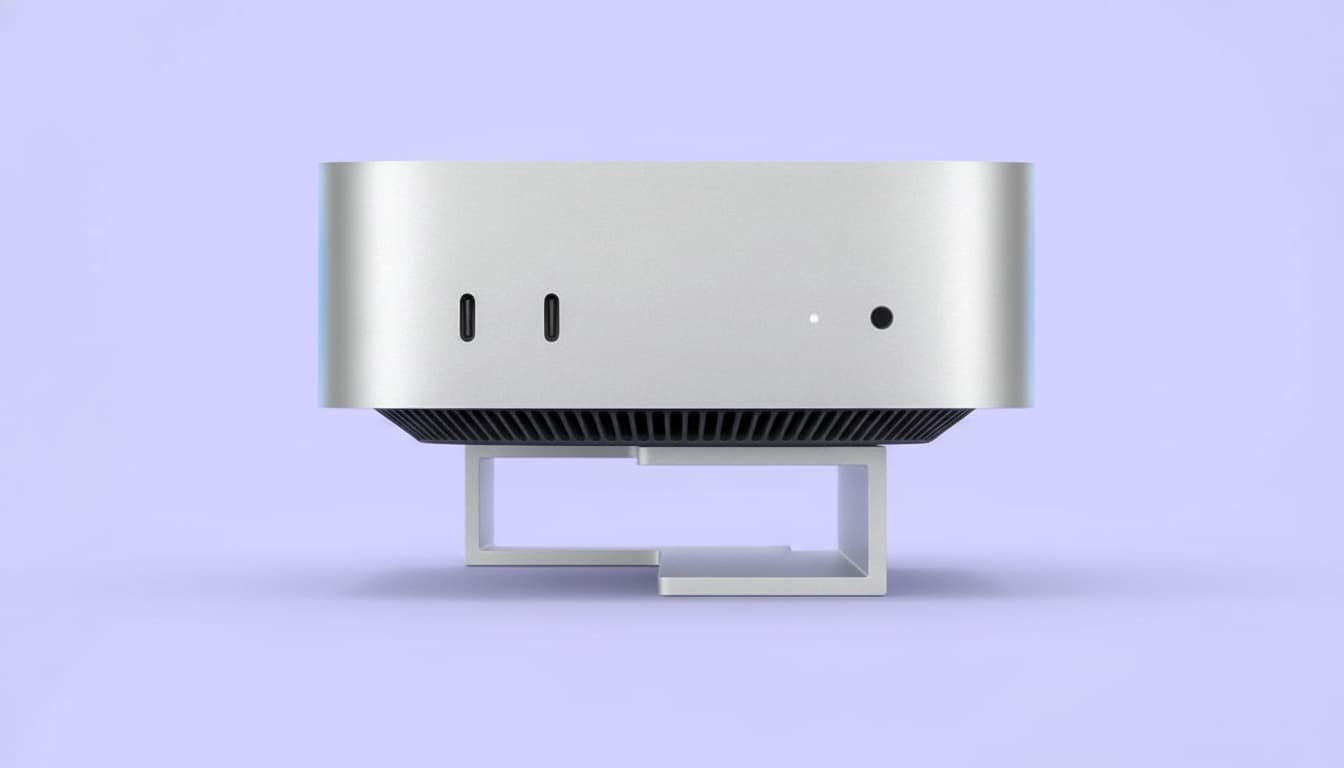
Apple’s new Mac mini powered by the M4 chip is one of the most surprising desktop releases of the year—not because it brings flashy marketing or dramatic design changes, but because it delivers three major upgrades that make it far more interesting than most people expected. Apple revealed the new Mac lineup through a series of press releases rather than a full event, but the Mac mini stands out in a big way for size, performance, and pricing.
This new generation keeps the familiar minimalist look but shrinks the computer into a footprint that is almost comically small. At the same time, Apple doubles the base memory, enhances performance significantly, and creates one of the most appealing entry-level Macs in recent years. For those needing portability or a compact workstation, even the higher-end configurations have a strong case.
The biggest surprise is the size. Apple often focuses on thinness and minimalism, but the M4 Mac mini pushes this to a new level. The chassis now measures just 5 inches by 5 inches, and stands 2 inches tall. It is smaller than a compact camera with a lens attached, smaller than a roll of duct tape, and only slightly bigger than an Apple TV. It looks more like a tiny Mac Studio than the classic Mac mini shape.
Despite the tiny size, Apple has installed a fan, well-designed thermals, and a full set of ports at the back—including Gigabit Ethernet, HDMI, and three Thunderbolt ports. The front includes two USB-C ports and a headphone jack. USB-A is now gone, and there is still no SD card slot, but the overall port selection remains practical.
One curious design decision is placing the power button underneath the computer. It’s not a major issue since most users rarely turn desktops fully off, but it’s an unusual choice that feels like one of Apple’s intentional quirks.
Typically, shrinking a computer means compromising cooling or performance. But Apple’s efficient silicon allows the Mac mini to stay quiet and cool even under load. During heavy tasks, the fan becomes audible but never distracting. For everyday use, the system is nearly silent. Without concerns about battery or speakers, Apple could focus entirely on cooling and processing efficiency, and the result works well.
The second big surprise is the price-to-performance ratio. The base Mac mini with M4 starts at $599, and now includes 16GB of unified memory by default—a major improvement from the previous 8GB baseline.
The M4 chip itself includes a 10-core CPU and 10-core GPU, offering excellent single-core speed and strong everyday multitasking performance. The gains over the M1 generation are now substantial, especially for people coming from older Intel-based Macs. The base model handles general productivity, browsing, coding, and even photo editing without issue. Pixelmator and other optimized apps run extremely smoothly.
Tasks like heavy 4K video work or complex 3D projects would require a stronger setup, but for everyday users, students, and office workloads, the base mini is more than enough.
Compared to the new M4 iMac, which starts at $1,299, the Mac mini provides nearly identical performance at less than half the cost. Buyers can use the price difference to choose their own display, keyboard, and accessories.
Apple is known for upsell pricing, and the Mac mini is no exception. While the base unit is a great deal, upgrades quickly erase the value. Increasing storage to 1TB adds $400. Adding 10-gig Ethernet costs another $100. Higher-end configurations escalate the price until it becomes comparable to other Macs.
For users who simply need a reliable Mac desktop for daily work, the base model is the sweet spot. Its performance is excellent, the memory is doubled, and external storage can be added later via Thunderbolt or USB-C.
Students get an even better deal: with educational pricing, the base Mac mini drops to $499, making it one of the best-priced Apple devices currently available.

The third major standout feature relates to the upgraded configuration. For professionals needing workstation-level power in a compact form, the Mac mini with M4 Pro becomes one of the most appealing portable desktop options Apple has ever made.
Since Mac Studio and Mac Pro remain on M2 generation chips, and the iMac only offers the base M4, the Mac mini becomes the easiest way to access M4 Pro performance in a desktop form. Starting at $1,399, it offers:
In benchmarks, the M4 Pro Mac mini produces the highest CPU single-core scores of any desktop Mac currently available, outperforming even workstation-class systems. In multi-core tests, it matches or slightly exceeds previous high-end Macs, showing how far silicon efficiency has progressed.
In GPU performance, the M4 Pro version approaches M1 Max territory, making it suitable for demanding projects like video editing, software development, and content creation.
For creators who previously traveled with bulky desktops or heavy laptops, this Mac mini offers a powerful alternative. Plug it into monitors at different locations and carry it in a small case or backpack.
Buy the base model if you:
Buy the M4 Pro version if you:
Avoid upgrading the base model’s specs if possible, because the pricing structure reduces its value quickly. Instead, choose either the base model or the full M4 Pro model depending on needs.
The new Mac mini with M4 is one of the most interesting and practical Macs Apple has released in years. Its incredibly small footprint, improved cooling, doubled base memory, and strong everyday performance make it a standout value at $599. Meanwhile, the M4 Pro configuration turns it into a powerful, compact workstation that outperforms larger and more expensive Macs.
Whether you need an affordable entry into macOS or a portable professional workstation, the Mac mini lineup now has clear and compelling options. If you prefer a desktop system and don’t need a built-in display, this may be the best overall value in Apple’s current Mac ecosystem.