Breaking News
Popular News




Enter your email address below and subscribe to our newsletter
Smart Discovery Store
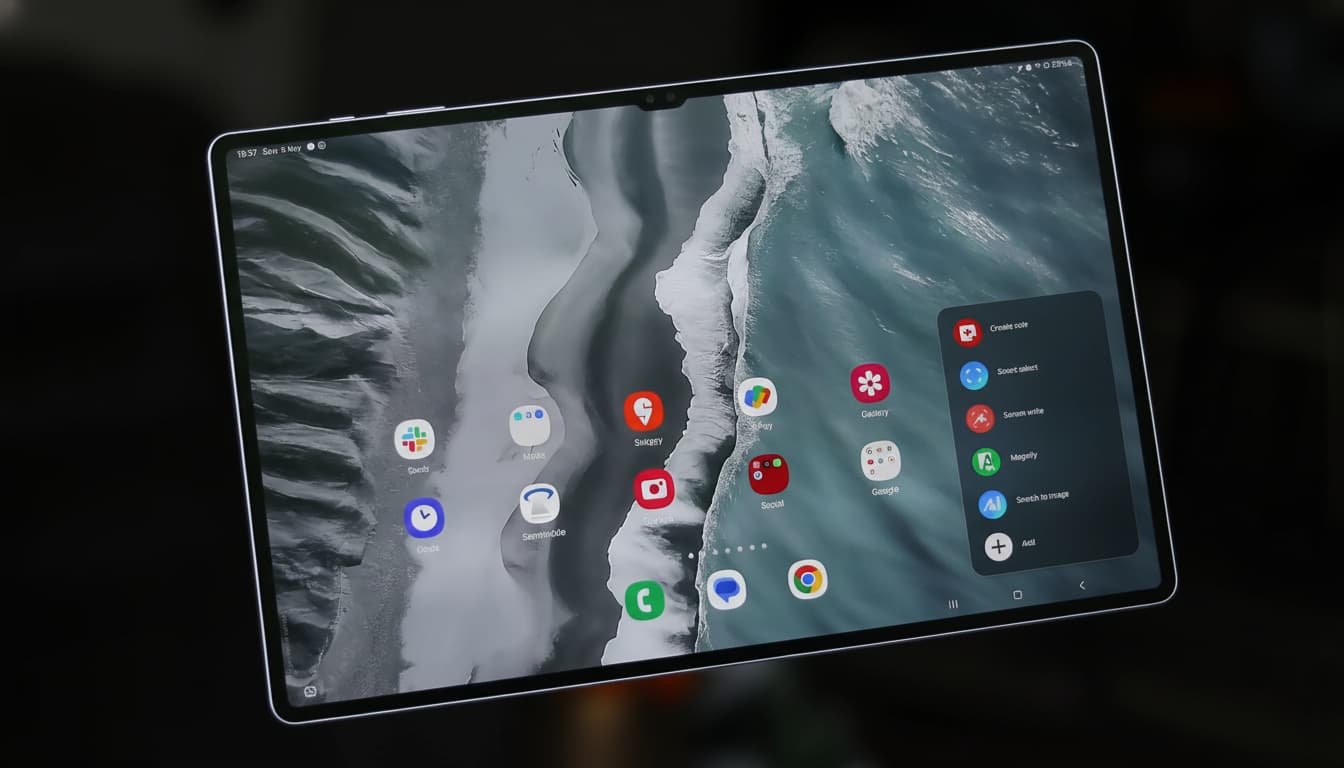
Samsung’s Galaxy Tab S11 Ultra enters the flagship territory with one mission: convince you that a tablet can finally be your computer. It carries a massive 14.6-inch WQXGA+ AMOLED panel, a thin 5.1 mm chassis, premium aluminum frame, and enough internal power to compete with traditional notebooks. Even before turning it on, the hardware presence alone gives it away — Samsung isn’t treating this as a casual entertainment slab. This is a workstation disguised as a tablet.
The anti-reflective coating subtly reduces glare without using a full matte texture, making it easier on the eyes in bright environments while still keeping that punchy AMOLED sharpness. The back camera module includes a 13MP main and 8MP ultrawide camera, while the four-speaker setup balances surprising bass and clarity for a portable device. The S Pen magnets to the top now and no longer needs charging, simplifying Samsung’s stylus workflow. Every design change feels intentional — thinner, cleaner, and more focused on productivity. This is Samsung attempting to redefine what a premium Android tablet should feel like.
Inside is MediaTek’s Dimensity 9400+ processor supported by 12GB or 16GB of RAM depending on your storage tier. On paper it delivers strong flagship performance, especially for multitasking, productivity, and Android apps that benefit from faster CPU bursts. Samsung claims over 25% improvements in both CPU and GPU performance over the S10 Ultra, and in daily use that feels accurate.
The tablet wakes instantly, apps snap open fast, and multitasking feels effortless with multiple windows on screen. However, thermal behavior under extended load reveals its limits. Stress tests show the S11 Ultra dipping performance during long sessions, whereas the iPad Pro M5 holds stable speeds for far longer. It’s not that the S11 Ultra is slow — far from it — but heavy video editing, 3D workloads, and multiple performance-intense apps open at once will expose Android’s and the chipset’s limitations.
Still, for browsing, office tools, drawing apps, split-screen multitasking, and light creative work, there’s more power here than most users will ever max out. This is a performance package designed to replace ultrabooks, not compete with gaming laptops.
The defining question for tablets like this is simple: can they replace a laptop? Samsung has pushed DeX mode for years — a desk-top style environment with windowed apps, snap layouts, a taskbar, and shortcuts that make Android feel like a lightweight ChromeOS-Windows hybrid. But Android 16 introduced its own native desktop mode, and here’s where things get messy.
When you hit the keyboard’s DeX shortcut while using the tablet alone, you’re not activating Samsung DeX — you’re entering Google’s new desktop mode. That mode is functional, supports floating windows, snapping left or right, and smoother scaling than older Android builds. But it lacks important tools like full grid snapping, quadrant tiling, or predictable multi-display behavior.
Connect the tablet to an external monitor, and suddenly Samsung DeX appears. This version is mature, polished, and much closer to a laptop-style desktop. You get a more reliable taskbar, unified notifications, full multi-window control, proper input behavior, and a general sense of cohesion. The problem is that users end up switching between two different desktop philosophies depending on whether a monitor is attached.
As a productivity device, it absolutely works. But it’s inconsistent. You can type documents, run spreadsheets, browse with multiple tabs, handle work tasks, and even edit light video projects. But it still doesn’t have the unified elegance of macOS or Windows. The potential is huge — it just needs cleanup and tighter integration.
Battery life on the S11 Ultra tells a more complicated story. Samsung advertises up to 23 hours of video playback, but real testing puts it at just under 14 hours. Meanwhile, the iPad Pro M5 claims 10 hours and actually pushes closer to 16. In everyday use, the S11 Ultra lasts a workday unless you push screen brightness to the limit or keep multiple windows running in desktop mode.
Charging is solid: 45W brings the giant 11,600 mAh battery to 50% in 40 minutes and to full in just under two hours. Not the fastest on the market, but reasonable given the battery size.
The Book Cover Keyboard Slim is surprisingly excellent. Key travel is deeper than expected, the tactile bump is crisp, and typing feels closer to a real laptop than any folio keyboard Samsung has made before. The biggest drawback is the fixed viewing angle — you cannot adjust it. While the magnetic snap and pogo pin connection are secure, this rigid posture can feel limiting during long sessions.
Speakers offer lots of bass — occasionally too much — but overall they outperform most tablets. Camera quality is respectable, with the 13MP rear camera producing less jelly effect than the 8MP ultrawide. It’s not a photography tool, but it’s more than enough for video calls and quick captures.
The Galaxy Tab S11 Ultra is the most ambitious Android tablet ever built. Stunning display, elite hardware, S Pen convenience, loud speakers, expandable storage, and serious performance — Samsung nailed the physical product. As a tablet, it’s incredible.
As a laptop replacement, it’s very close but not flawless. Android’s desktop mode is promising but unfinished. Samsung DeX is polished but only fully enabled when connected to a separate monitor. And switching between the two modes creates friction that prevents a seamless desktop experience.
Pricing starts at $1,199 for the tablet and $210 for the keyboard cover, which firmly places this in laptop territory. For users in Samsung’s ecosystem — or anyone who wants a workstation-grade tablet with the option of desktop features — this is easily the best Android tablet ever made. But for people who expect a perfect laptop-level desktop environment, it still needs refinement.
If Samsung unifies these two desktop modes and pushes deeper into laptop functionality, the Tab S12 Ultra might be the moment the dream becomes fully real. For now, the S11 Ultra is powerful, polished, and extremely capable — but not yet a complete laptop replacement for everyone.
Samsung Galaxy Tab S11 Ultra on desk with external monitor connected, keyboard attached, multitasking windows visible, showing its hybrid tablet-desktop functionality