Breaking News
Popular News


Enter your email address below and subscribe to our newsletter
Smart Discovery Store
The Galaxy XR arrives in a plain, minimal outer box, but the experience inside immediately feels more premium. Opening the tabs reveals the headset showcased on a raised pedestal, wrapped in protective film and presented as a centerpiece. Underneath are two additional boxes containing the power accessories, microfiber cloth, quick start guide, and the modular face spacers. Even though the exterior packaging looks basic, the inside layout has the polished feel of a flagship product launch. The microfiber cloth is large, soft, and made specifically for lens-safe cleaning, which is essential because scratches on XR lenses are costly and impossible to repair at home. Beneath the headset box sits the power system: a 45-watt fast charger, USB-C to C cable, and the battery pack that attaches to the headset via Samsung’s new locking mechanism. Everything in the box reflects a product designed for daily XR use, travel, and upgrades.
The Galaxy XR power system uses a proprietary connection that physically locks into the headset. It does not share the hot-swap flexibility seen on some earlier VR devices, meaning the XR relies entirely on the external battery pack. Pressing the release button detaches the power module, and sliding downward locks it into place. The charging cable uses a clip-in design to prevent accidental disconnection, and the battery pack includes its own indicator LED to show remaining charge. The box includes slim and thick spacers for adjusting the distance between your eyes and the lenses. This is important for users wearing glasses, though increasing the distance slightly reduces field of view. Light blockers attach magnetically to the headset, snapping into place on the inner frame to reduce ambient light intrusion. These components make the XR more customizable than most all-in-one headsets, supporting multiple face shapes and optical needs.
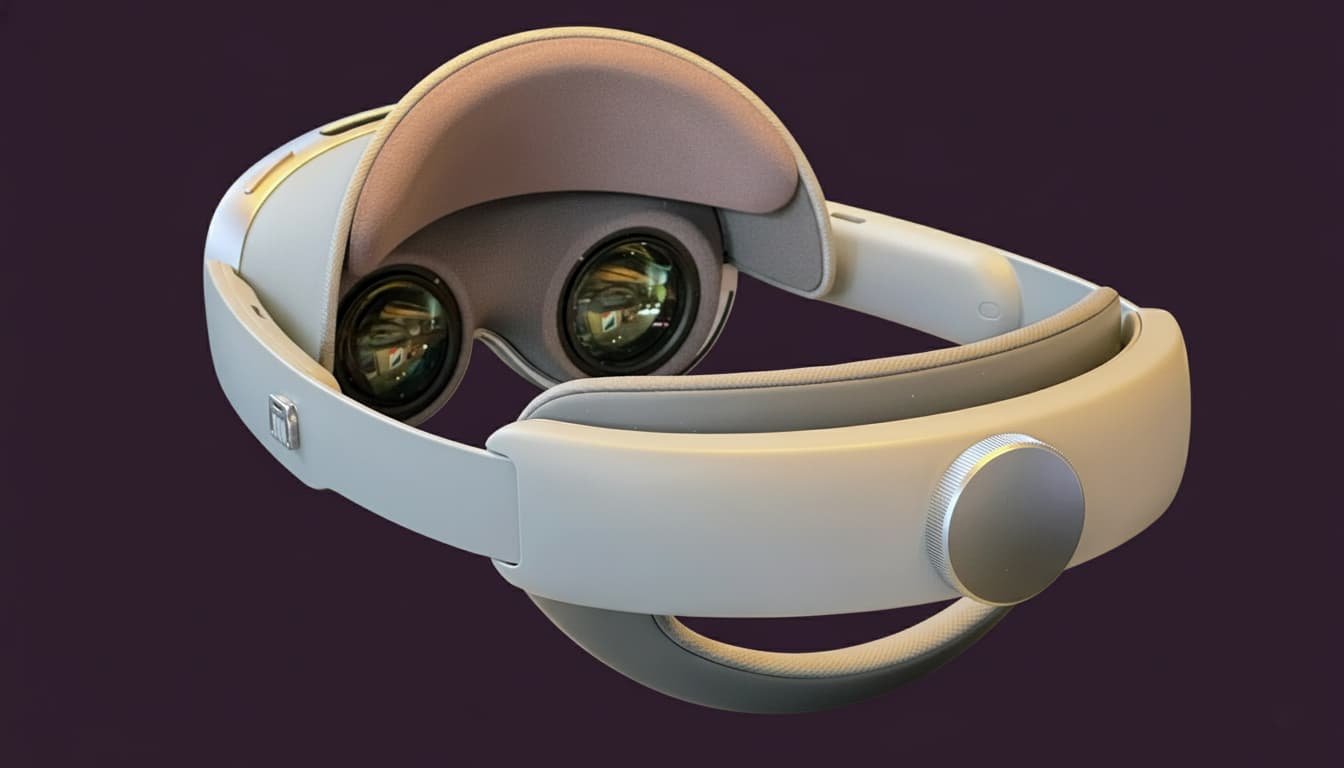
Removing the protective film reveals the full sensor array. The headset includes dual high-resolution color passthrough cameras, four exterior tracking cameras, two downward tracking cameras, a depth sensor, a flicker-cancellation sensor, six microphones, and four speakers arranged for upward and downward audio projection. This combination delivers positional tracking, hand tracking, facial capture, and spatial audio without external hardware. The headset’s front panel uses glossy materials, while the sides integrate vents, microphones, and control buttons. A hidden USB-C port sits behind a small sliding panel and supports data transfer and video-out, allowing the headset to mirror content to a TV or monitor. It cannot receive HDMI input and does not support powering the headset. Pancake lenses dramatically reduce device thickness and weight while improving clarity compared to older Fresnel designs. Eye tracking cameras sit behind the lenses, capturing pupil movement, gaze direction, and facial motion for more expressive avatars. Automatic IPD adjustment moves the lenses to match the user’s eye spacing between 55–70 mm. The headband uses a rotating dial for tightening, while the cushion and spacers attach magnetically to simplify adjustments.
The Galaxy XR controllers resemble the Meta Quest 3 layout in shape, button placement, and joystick feel. Each controller includes a joystick, buttons, triggers, grip sensors, and detachable battery compartments with pre-installed AA batteries. The moment the trigger reaches its full pull, a small vibration activates under the finger, creating responsive tactile feedback. Although the controllers feel slightly less premium in texture than Quest 3 versions, they retain a similar overall ergonomics profile. The XR controllers introduce touch-sensitive pads on the outer surface for menu scrolling, though this feature currently works only in limited applications. The controllers transition from the real world to virtual instantly, with virtual models reflecting button presses in real time. They support haptics through both the trigger and base motors. While the XR system allows seamless switching between hand tracking and controllers, hand functions remain disabled while a controller is held, ensuring clear interaction modes.
The carrying case arrives in another plain white box, but the case itself uses a soft padded exterior with a leather-like finish that feels durable and impact-absorbing. The zipper is firm and slightly resistant on first use but smooth once broken in. Inside, the case features soft microfiber lining and reinforced cutouts for the battery pack, headset, charger, and cable. The headset fits snugly, requiring the dial fully tightened for a secure hold. The case is not officially designed to store controllers, but with the right angled placement, both controllers fit without touching the lenses or pressing unwanted buttons. This makes the case far more practical for travel than Samsung suggests. Everything closes securely with magnetic flaps holding the accessory cover in place. It becomes a compact, fully portable storage solution for the entire XR system.
Setup is simple for Samsung users—scan a QR code using a Galaxy phone and account data transfers instantly. Non-Samsung devices can still complete manual setup. Inside passthrough mode, users view their real environment with high clarity, and hand interactions activate when raising a hand into view. Pinching opens the launcher, while wrist flicks handle scrolling. Eye tracking allows selection by simply looking at an icon and pinching. Holding the side of the headset recenters the display. Double-tapping the right side toggles immersive mode, instantly transporting the user into a 3D environment. Voice control activates by holding the top button, enabling Gemini interactions. The headset records spatial video through the dual passthrough cameras, producing 3D playback inside immersive view. The YouTube app includes a dedicated XR mode supporting 3D, 180-degree, and 8K spatial videos.
The Galaxy XR supports two categories of apps: XR-ready 2D experiences and fully immersive XR games. Users can install supported VR titles directly from the Play Store or link the headset to a gaming PC through GameLink. Wi-Fi Direct offers low-latency streaming for laptops, while wired Ethernet desktops benefit from standard Wi-Fi mode. Inside SteamVR, games run smoothly at 90 Hz with clear textures, deep blacks, and vivid OLED colors. Some controller bindings require adjustments, such as assigning the left joystick click, but gameplay remains stable once configured. Population: One, shooters, simulators, and VR workflows all operate without tracking drift. The menu can be opened anytime over the game environment for multitasking, and returning to SteamVR is immediate using recent apps.
The headset supports desktop work through VR applications such as Virtual Desktop or direct Samsung PC Link for Galaxy Book laptops. The large virtual displays and passthrough capability create a mixed reality workstation. After 90 minutes of combined gaming, setup, and recording, the headset remains comfortable without significant forehead pressure. Battery life after heavy use measures around 36 percent, and the front panel becomes warm but not uncomfortable. The external battery pack remains warm in the pocket but stays safe to handle. The full system handles extended sessions without overheating or discomfort, and spatial audio from the four speakers delivers surprising clarity and room presence.
The Galaxy XR emerges as a powerful hybrid headset combining VR immersion, mixed reality passthrough, high-resolution cameras, OLED clarity, advanced tracking, and PC connectivity. The modular spacers, premium case support, and controller compatibility make it versatile for gaming, entertainment, productivity, and everyday spatial applications. With access to the entire Google Play Store, XR-ready apps, VR worlds, Steam VR, and spatialized YouTube content, the XR platform arrives with a complete ecosystem from launch. Its build quality, lens design, microphone array, and tracking cameras place it among the strongest mixed reality headsets available. The Galaxy XR’s blend of premium hardware and flexible software positions it as one of the most capable mixed-reality headsets released in this generation.